
Every sold item, accounted for.
Scan2Tray tracks every item from the moment it sells to the moment it ships. Buyer, item, tray number, status — all visible in real time on your Mac or Windows desktop app. Nothing gets lost, nothing ends up with the wrong person.
Every sale, captured automatically
Traditional Whatnot order tracking means exporting a CSV after the show, manually matching each row to a physical item, and hoping you got it right. The second a stream runs fast enough that you can't keep up mentally, that system breaks — items get sent to the wrong buyer, multi-buy customers end up with half their order, and you spend your evening staring at a spreadsheet.
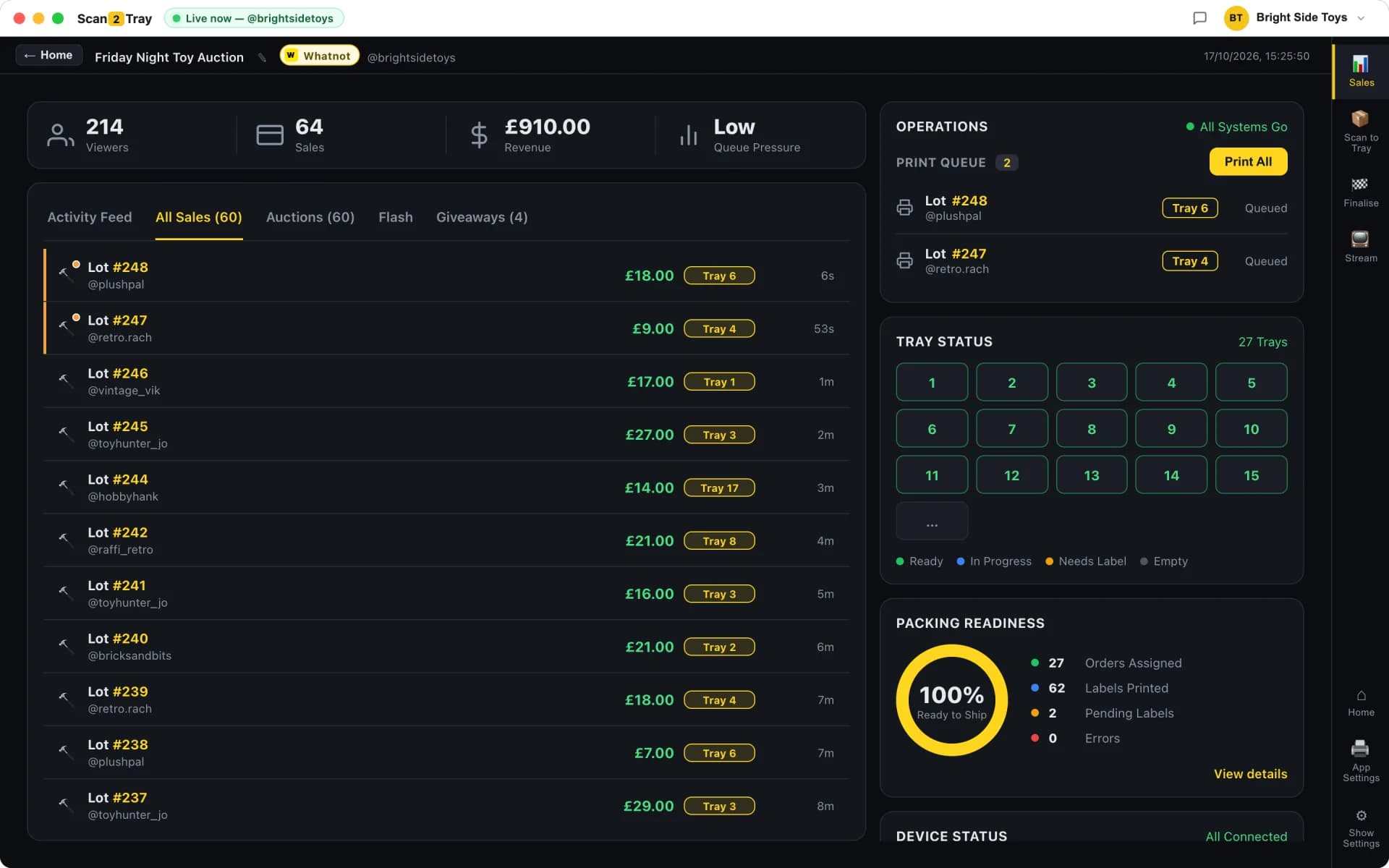
Scan2Tray replaces that entire process with a live connection to your Whatnot show. The second a buyer wins your live auction, Scan2Tray records it — item description, price, Whatnot order ID, buyer username, and the tray number they've been auto-assigned to. No CSV download. No manual data entry. No gap between selling and tracking.
- Live capture straight from the Whatnot stream
- Each buyer gets a tray number — every item they win goes to the same tray
- Sold / in-tray / packed status on every item
- Whatnot order ID on every line so you can cross-check anything in seconds
- Shipping labels auto-reordered to match tray order
- Full history of every item you've ever sold, searchable instantly
What we mean by "live capture"
Scan2Tray's desktop app runs alongside your Whatnot show — it's not a browser extension, not an API polling script. It watches your stream directly and picks up every hammer-drop within a second or two. By the time you've moved the item off your selling table, the sale is already in the system and a label is printing.
Why tray assignment matters for tracking
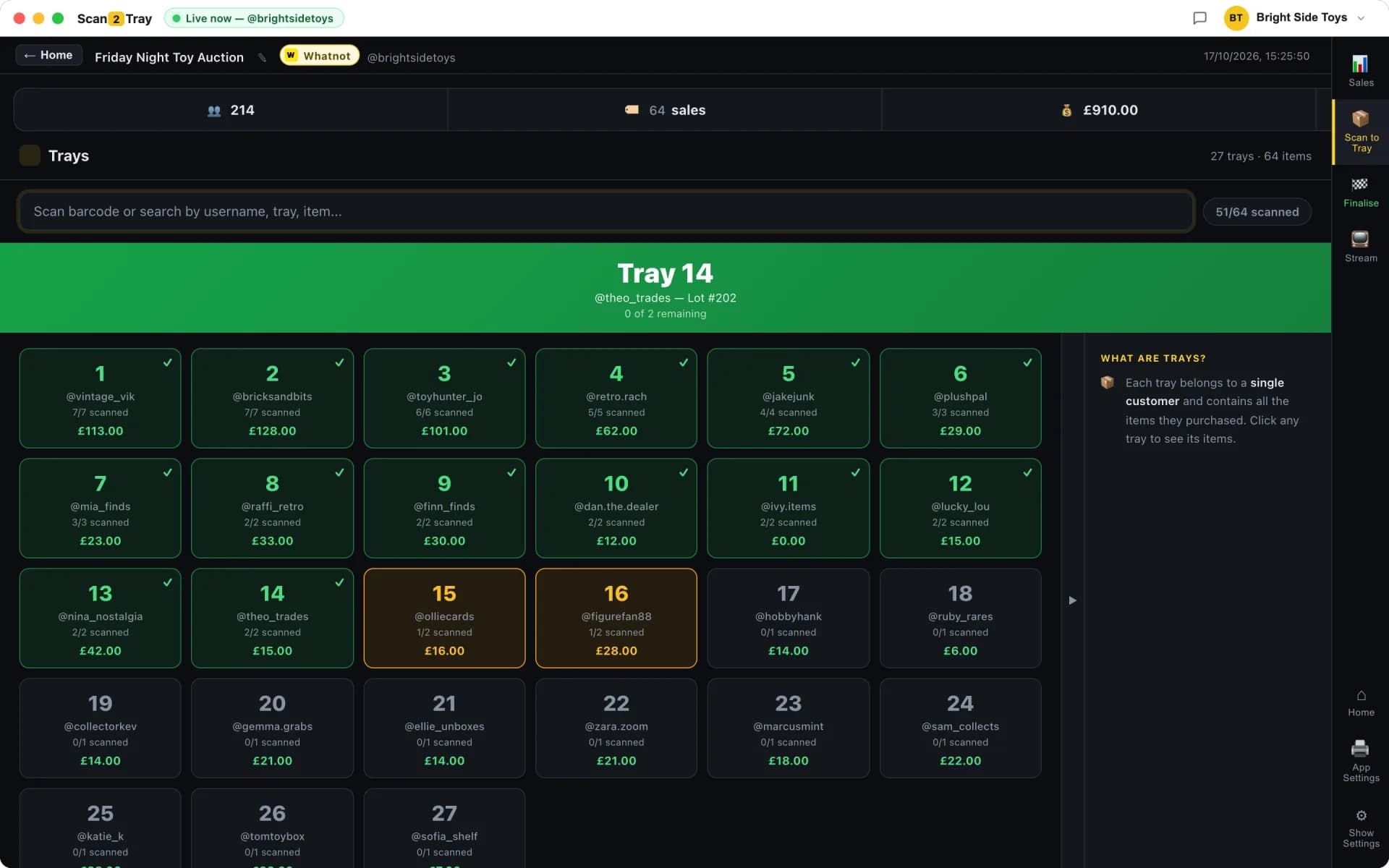
The moment a buyer wins their first item, Scan2Tray assigns them a tray. Every following item they win during the show prints with the same tray number. This isn't just a packing convenience — it's a tracking guarantee. If a buyer won five items, all five labels have the same tray number, and you can glance at that tray at any point and know exactly who's in there and what they won.
- Same buyer, same tray, every item — automatic
- Tray view shows buyer, total spend, item count, status
- Cross-reference Whatnot order IDs in one click
- Mark trays "packed" and "shipped" as you go
Simple Mode means you don't manage anything manually
Here's the counterintuitive thing about order management on Whatnot: the best tool is the one that demands the least management. Scan2Tray's Simple Mode is the default because it requires zero active thinking — a tray-assigned label prints the instant each item sells, you stick it on, you drop it in the numbered tray. The inventory tracking happens invisibly.
You don't set up SKUs. You don't scan items as they sell. You don't tag anything. The software captures what it needs from the Whatnot stream automatically, and the physical tracking happens through the label → tray → shipping-label chain. If the label printed, the item's tracked. If it's in the tray, it's going to the right buyer. If the shipping label matches, it's going to the right address.
Power modes for sellers who want more control
Some sellers want to explicitly confirm each item before it ships. Power modes let you do that — scan every item as you pack to cross-check against the system, import Whatnot's shipping PDF manually if you prefer working at your own pace post-show, use pre-printed stock barcodes for sub-5-second lookups. The underlying tracking model is the same; you just get more control over when and how you verify.
- Barcode-verified packing for explicit item-to-parcel checks
- PDF slip import for post-show bulk workflows
- Pre-printed stock barcodes for instant tray lookup
- Free mobile app for multi-packer team verification
What happens to unsold items
Scan2Tray only tracks sold items — it's not a full inventory system, and it doesn't try to be. For unsold items, most Whatnot sellers use a simple "stock on hand" spreadsheet or just physical organisation. We've deliberately stayed focused: Scan2Tray is about the sale-to-shipped pipeline, not warehouse management.
Sale-to-shipped visibility
The end-to-end picture: every sold item lives in the desktop app with its current status. "Sold" means the hammer just dropped and the label is printing. "In tray" means the label's been stuck and the item is in the correct tray. "Packed" means it's in the shipping parcel with its shipping label on. Filter by status, by buyer, by date, by Whatnot order ID — whatever you need to answer a customer question or audit your own workflow.
When a buyer messages you asking "has my order shipped yet", you can answer in five seconds. Open Scan2Tray, type their Whatnot username into the search, see exactly which tray their items are in and what status they're at. No spreadsheet, no digging, no "let me check and get back to you".
Whatnot order tracking: the old way vs Scan2Tray
Most Whatnot sellers run some version of spreadsheet-plus-memory. Here's what changes with live capture and tray assignment.
| Spreadsheet + memory | Scan2Tray | |
|---|---|---|
| When sales are captured | After show (CSV export) | Live, second-by-second |
| Matching buyer to items | Manual lookup every time | Auto-assigned tray |
| Multi-buy customer items | Risk of being split | Always in the same tray |
| Finding a specific order | Ctrl+F in spreadsheet | Type buyer name, instant result |
| Item status (sold/packed/shipped) | Not tracked or colour-coded manually | Real-time status on every item |
| Answering "has my order shipped" questions | Check spreadsheet, dig through boxes | 5-second answer |
| Catching missing items before ship | You might notice | System flags discrepancies |
Common questions
Does Scan2Tray handle full Whatnot inventory management?+
No, and we deliberately don't try to. Scan2Tray is focused on sold-item tracking — the pipeline from hammer-drop to shipped parcel. Full warehouse inventory (what's on your shelf, restock alerts, supplier management) isn't something we do. Most Whatnot sellers find a simple spreadsheet or their existing e-commerce system handles that fine.
How does Scan2Tray know which items a buyer has won?+
The desktop app connects to your Whatnot stream directly and picks up every sale as it happens. It reads the item description, price, and buyer username from the auction data, and records each sale as its own tracked line with the Whatnot order ID attached. You don't need to do anything — it just works in the background while you sell.
Can I look up a specific Whatnot order after the show?+
Yes. Scan2Tray keeps full history of every sale you've ever run through it, searchable by buyer username, Whatnot order ID, item description, date, or show. You can answer "did this buyer get their item" questions in seconds, even for shows from months ago.
What if I sell the same item in two different shows?+
Each sale is tracked against the show it happened in, so there's no collision. If you listed the same item twice (e.g. relisted an unsold item in a later show), both sales are tracked independently with their own Whatnot order IDs and buyer assignments.
Does tracking work for Buy It Now sales as well as live auctions?+
Yes. Scan2Tray captures Buy It Now sales, giveaways, and flash sales as well as regular live auctions. Everything that creates a Whatnot order gets tracked the same way.
What happens if Scan2Tray misses a sale?+
It's rare, but possible — a connection blip, a Whatnot API hiccup. The desktop app retries automatically, and any missed sale shows up via Whatnot's shipping PDF import at the end of the show. In practice, fewer than 0.1% of sales are missed by live capture, and the PDF import catches those before anything ships.
Related reading
Whatnot order management
The full sale-to-shipped pipeline — how tracking and packing connect end to end.
Whatnot shipping tool
Why shipping labels reordered to match your tracked trays cuts pack time in half.
Whatnot seller tools overview
The complete picture — what Scan2Tray does, what it doesn't, and why it's built the way it is.
How small mistakes after a Whatnot auction cost big money
Why "I'll remember who bought what" stops working fast — and what to do about it.
Start completely free.
Pack real shows end to end — scanning, trays, label printing, the lot — before you pay a penny. Every plan covers Whatnot, TikTok Shop and eBay Live in one subscription. Upgrade only when you outgrow the free allowance.
No card required to start
Run your first couple of shows free and see Scan2Tray work end to end.
Get started — free- Run your first shows on us — no card needed
- Whatnot, TikTok Shop & eBay Live included
- Full live sale capture & auto-assigned trays
- Barcode & shipping label printing
- macOS and Windows apps included
- Upgrade any time as you grow
For regular sellers running shows every week.
Choose Standard- Unlimited shows
- Up to 150 items per show
- Live sale capture & auto label printing
- Revenue tracking & reports
- Priority email support
For high-volume sellers and teams with no limits.
Choose Unlimited- Everything in Standard
- Unlimited items per show
- Unlimited scans
- Advanced modes for rapid sellers
- Export & advanced reports
Prices shown in your local currency. Cancel anytime — your data stays yours.